ai board assistant
An AI Board Assistant That Prepares, Never Decides
By Perry Price · October 28, 2026 · 5 min read
Boards rarely lack information. They lack one place where it lives. The bylaws are in one folder, last year's minutes are in another, a vote was taken over email, and the person who remembers why you decided it has rotated off. An AI assistant can help with that, but only if it is clear about its job.
Here is how we think about that job, and how Steward by Qwibie does it today.

Start with who is allowed to see what
A board is not one audience. The treasurer sees the financials. A committee sees its own documents. Some items are privileged and meant for a few people. An assistant that ignores those lines is a problem waiting to happen, however helpful it sounds.
Steward reads only what each person's role allows. Your board's administrators decide who holds which role, and Steward follows that. Privileged items in the document vault stay restricted to the right people, and the answer you get depends on what you are allowed to see.
Answers that show their sources
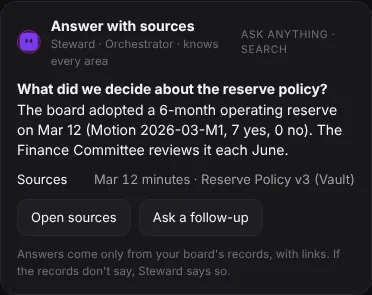
Ask Steward a question and it answers from your own minutes and documents, with sources. It shows those sources so anyone can check the answer. If the records don't say, it tells you.
That last behavior matters more than it sounds. A board is better served by "your records don't say" than by a confident sentence nobody can check against a page. A source you can open is worth more than a smooth answer.
On the demo board shown on our site, a question like "What did we decide about gift acceptance, and why?" comes back with the answer and the sources beside it.
Voting rules, with citations, and a reminder that your bylaws come first
When a motion comes up, one of the first questions is which rule applies. Once your organization type and state are set, Steward shows the voting rules Qwibie has on file for them, with citations.
We are careful about how far that goes. These are the rules Qwibie has on file, they come with citations, your bylaws may be stricter, and it is not legal advice. Your bylaws decide which rule applies to your board. In a meeting, each vote's rule can be a majority of votes cast, two-thirds, or a majority of the whole board.
Drafts that people review and decide
This is where Steward does the routine preparation, and it is also where the line has to be clearest. Steward drafts. People review and decide.
- Agenda and packet. Steward builds the agenda and the packet for the chair and reminds people about missing items.
- Minutes. Steward drafts the minutes, with the motions and votes, from your notes or transcript. The secretary reviews the draft and can approve it or request changes.
- Treasurer report. Upload the financials and Steward drafts the report, with budget against actual by fiscal year. People approve it. Steward never moves money.
- Announcements. Steward helps you write. You choose who it goes to.
Every vote is cast by a person. Steward never votes.
Meet live, or decide between meetings
Boards meet in different ways, and the tool should not force one. You can meet inside Qwibie by video or by phone, and anyone can dial in. Quorum is declared by a person and recorded.
Or you can decide between meetings by unanimous written consent before a fixed close, if your bylaws allow it. A motion passes only when every director consents in writing before the close. If anyone wants a meeting instead, one "Needs a meeting" sends that motion to a live meeting.
Signed minutes you can check
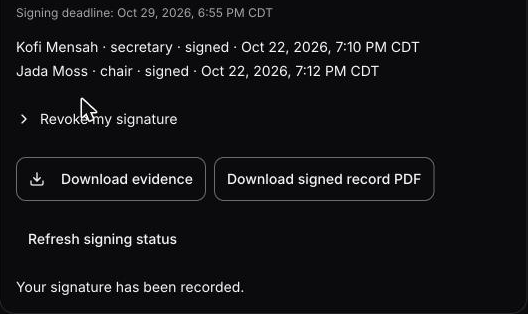
Approved minutes are signed in order: the secretary first, then a different officer. Each signer types their name and confirms intent. Officers can download the signed minutes as a PDF and the signing record.
To be plain about it: this is not a certificate-backed digital signature or an independent timestamp. What you get is a signing record your officers can download and check.
What Steward does and does not do
Steward does:
- Answer from your own records, with sources, and say so when the records don't say.
- Show each person only what their role allows.
- Once your organization type and state are set, show the voting rules Qwibie has on file for them, with citations.
- Draft agendas, packets, minutes and the treasurer report for people to review.
- Work in every area of the app. You can type to it, dictate a draft, or talk to it.
Steward does not:
- Vote, approve or sign for your board.
- Move money.
- Give legal advice. Qwibie is not a law firm and does not provide legal advice, and your bylaws may be stricter than the rules on file.
- Replace the people who decide. It is an AI assistant, not a person.
- Use your board's data to train AI models.
Built for nonprofit boards, open to others
Qwibie is built first for nonprofit boards. Boards of for-profit and private companies are welcome too. The packet, minutes, votes and the vault work the same way for them.
Try it with your own records
The best test is a question you already know the answer to. Upload your bylaws and last year's minutes, ask Steward about a past decision, and follow its sources back to the page. That shows you how your own records read in Steward.
The 14-day trial needs no card, and everyone on your board is included. You can find it on the pricing page. To see the whole app first, start with the platform overview.