board secretary
What a Board Secretary Prepares Before Every Meeting, and What Software Can Draft for You
By Perry Price · November 5, 2026 · 4 min read
If you are the board secretary, most of your work happens before anyone says "let's call the meeting to order." The agenda, the packet, the reminders and the notes plan all land on you, often as a volunteer with a day job.
This post walks through the practical preparation, in the order it usually happens, and says which parts Steward by Qwibie can draft and which parts stay with people. It covers tasks only. It does not define anyone's legal duties, and it is not legal advice.
Start with the agenda
Collect what belongs on the agenda: requests from the chair, officers and committee chairs, plus anything left unfinished at the last meeting. Then put the items in an order the chair can run.
Steward builds the agenda for the chair. The chair still decides what goes on it and in what order, and the draft is theirs to review and change.
Gather the packet
A packet usually holds the agenda, the last meeting's minutes, the treasurer report and whatever papers support each item. The point is that directors arrive having read the same things.
Steward gathers the packet, ready for the chair to review, and reminds people about missing items. Upload your Word, PDF and Office files to the document vault and find them fast, with privileged items restricted to the right people. Scheduled reminders go out before the meeting, so the chair doesn't have to chase.
Line up the treasurer report
Ask the treasurer for the financials early. Upload the financials and Steward drafts the treasurer report, with budget against actual by fiscal year, and calls out the variances. People approve it. Steward never moves money.
Check notice and quorum
Your bylaws may set how and when notice must go out and how many directors make a quorum. Check them, and ask your attorney if you are unsure what they require. Qwibie is not a law firm and does not provide legal advice.
In Qwibie, quorum is declared by a person and recorded, and a person opens and closes every vote. See how voting works in Qwibie for the details.
Plan how you will capture the meeting
Minutes are a record of what the board decided, not a word-for-word transcript. Before the meeting, decide how you will take notes: who is present, each motion, who moved and seconded, and the outcome.
You can meet inside Qwibie by video or phone, and anyone can dial in. Steward drafts minutes from your notes or transcript, with the motions and votes. You can upload your own notes or the transcript your meeting tool already produces. When an officer turns on AI note-taking in a meeting, Steward's tile says so in the room, and guests see a notice before anything they say is included. Steward turns what's said into notes for the minutes draft, and the secretary reviews them.
After the meeting: review the draft
This is where the secretary's judgment matters most. Steward drafts the minutes, and the secretary reviews the draft and can approve it or request changes. Your board then approves the minutes the way your bylaws say.
A practical way to review the draft:
- Read it against your own notes, not just on its own.
- Check that each motion reads the way it was moved.
- Check the names of who moved and who seconded.
- Check the tally for every vote, and who was present.
- Fix anything the draft missed or got wrong before anyone signs.
Signing the minutes
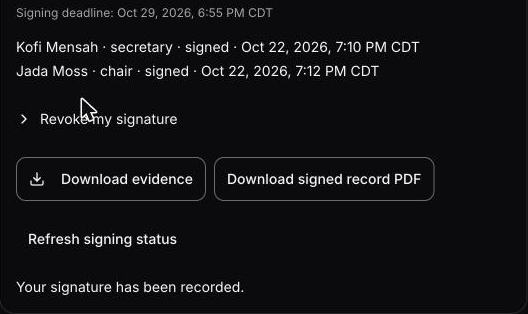
Approved minutes are signed in order: the secretary first, then a different officer. Each signer types their name and confirms intent. Officers can download the signed minutes as a PDF and the signing record.
To be plain about it: this is not a certificate-backed digital signature or an independent timestamp. What you get is a signing record your officers can download and check. The Trust page explains the signing steps.
What Steward drafts, and what stays with people
Steward drafts:
- The agenda and the packet, for the chair to review.
- Reminders about missing items, and scheduled reminders before the meeting.
- The treasurer report, from the financials you upload.
- The minutes, with motions and votes, from your notes or transcript.
People do:
- Decide what is on the agenda and run the meeting.
- Declare quorum, and open and close every vote. Every vote is cast by a person, and Steward never votes.
- Review the draft minutes, and approve them or request changes.
- Sign, in order, with a typed name.
Steward is an AI assistant, not a person. It prepares, and the people decide. The platform overview shows how each area of the app works.
Try it on your next meeting
If you are about to take the secretary role, or you have held it for years, the quickest test is your next real meeting. Prepare the agenda and packet, run the meeting, and review the draft minutes. Qwibie is built first for nonprofit boards, and boards of for-profit and private companies are welcome too. The 14-day trial needs no card, and everyone on your board is included. You can start it on the pricing page.