board governance
Five Questions to Ask Before Your Board Uses an AI Tool
By Perry Price · November 2, 2026 · 5 min read
Who signed off? In an October 31 op-ed in Fortune, EqualAI CEO Miriam Vogel asks what happens when an AI assistant acts in your name, and notes that in EqualAI's exercise, "audit trails were too thin to reconstruct what an agent had done." For a board, acting in your name means votes, minutes and signatures. Here are five questions to ask before your board uses an AI tool.
More software now arrives with an AI assistant attached. Before your board says yes to any of it, five plain questions will tell you most of what you need to know. They work on any vendor, including us.
After each question we say how Steward by Qwibie answers it, using only what is on our public pages, so you can hold our answers up against anyone else's.

Question one: Who can see what the AI knows about our board?
A board is not one audience. Some people see the financials, some see only their committee's papers, and some items are privileged. An assistant that flattens those lines is a problem, however helpful it sounds. A good answer names how access works, not just an intention to be careful.
Steward reads only what each person's role allows. Your board's administrators decide who holds which role, and access follows that. Each organization's records are kept separate from every other organization's at the application level. Privileged items in the document vault stay restricted to the right people, so the answer you get depends on what you are allowed to see.
Question two: Can we check the answer against our own records?
An answer nobody can check is a liability for a board. Ask the vendor whether the assistant shows where an answer came from, and what it does when the records say nothing.
Steward answers from your own minutes and documents, with sources, so anyone can open the source and check. If the records don't say, it tells you.
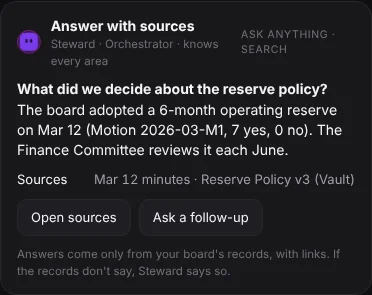
You can test this yourself in two steps. Ask a question you already know the answer to, then ask one you know your records do not cover. A trustworthy tool should handle those two cases differently: a source for the first, and a plain "your records don't say" for the second. If it answers both with the same confidence, you have learned something important.
Question three: Who makes the final call, the AI or our people?
No AI tool should vote, approve or sign for a board. If a vendor's answer is anything other than "the people do," ask for detail.
With Steward, the line is simple: Steward prepares and the people decide. It drafts, checks and reminds. It builds the agenda and the packet for the chair, and it drafts minutes from your notes or transcript. The secretary reviews the draft and can approve it or request changes. Every vote is cast by a person, and a person opens and closes every vote and declares quorum. Steward never votes, approves or signs for your board, and it never moves money. Steward is an AI assistant, not a person.
Question four: What happens to our board's data?
Two questions often get bundled together here: where does the data live, and is it used to train the AI?
Qwibie runs on Google Cloud. Data is encrypted in transit between your browser and Qwibie and between our services, and encrypted at rest in our database and file storage. Those controls cover the Qwibie app your board signs in to, not our marketing website. On training, the answer is plain: we don't use your board's data to train AI models.
AI that listens in a meeting deserves its own question. When an officer turns on AI note-taking in a meeting, Steward's tile says so in the room, and guests see a notice before anything they say is included. Steward turns what's said into notes for the minutes draft, and the secretary reviews them.
Ask every vendor for their answers in writing, and ask which AI providers handle your data. Our Trust page lists the providers Steward uses and says what we do and do not hold today, so you can read it before you ask us anything.
Question five: Will it give us legal advice?
It should not. What a board must do depends on its bylaws, its entity type and its state, and software cannot weigh all of that for you.
Qwibie is not a law firm and does not provide legal advice. Once your organization type and state are set, Steward shows the voting rules Qwibie has on file for them, with citations. Your bylaws may be stricter than those rules, and your bylaws decide which rule applies to your board. See how voting works in Qwibie. For anything that turns on your governing documents or state law, ask your attorney.
What Steward does and does not do
Steward does:
- Answer from your own records, with sources, and say so when the records don't say.
- Show each person only what their role allows.
- Draft agendas, packets and minutes for people to review.
- Work in every area of the app. You can type to it, dictate a draft, or talk to it.
Steward does not:
- Vote, approve or sign for your board.
- Move money.
- Give legal advice. Qwibie is not a law firm.
- Use your board's data to train AI models.
Put the questions to the test
Whatever you are evaluating, take the five questions into the demo and ask for specific answers. Then try the product on something real: upload your bylaws and last year's minutes, ask about a past decision, and follow the sources back to the page. The platform overview shows what Steward does in each part of the app.
Qwibie is built first for nonprofit boards, and boards of for-profit and private companies are welcome too. The 14-day trial needs no card, and everyone on your board is included. You can start it on the pricing page.